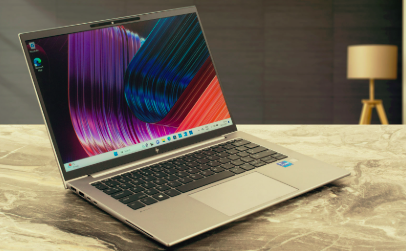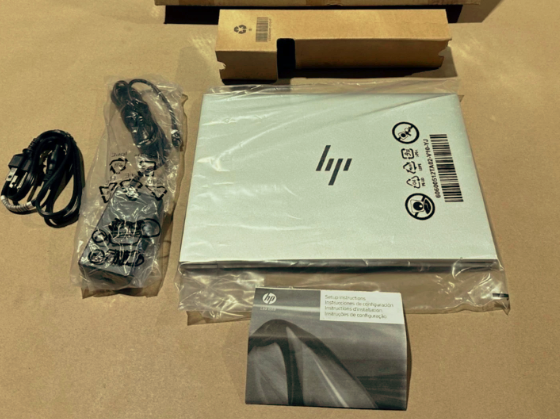
HP EliteBook 840 G10 14″ Notebook – Intel Core i5 13th Gen i5-1345U – 16 GB – 512 GB SSD
The HP EliteBook 840 G10: A Business Laptop That Actually Keeps Up With Your Day
Fast enough for real multitasking, light enough to forget you’re carrying it, and built with the kind of security features an IT department can actually get behind — the EliteBook 840 G10 hits that rare sweet spot between “premium” and “practical.”
A Laptop That Doesn’t Make You Choose
Most business laptop shopping comes down to an annoying trade-off: portability versus power, battery life versus performance, security versus simplicity. The HP EliteBook 840 G10 is genuinely happy news on that front, because it doesn’t really ask you to pick a lane. This configuration pairs a 13th Gen Intel Core i5-1345U processor with 16 GB of memory and a 512 GB SSD — a combination that handles the real workload of a modern office day (a dozen browser tabs, a video call, a spreadsheet, and a document editor, all running at once) without breaking a sweat.
What makes the 840 G10 worth writing home about isn’t any single spec, though. It’s how the whole package comes together: a 14-inch display in a chassis that stays genuinely portable, a keyboard and trackpad built for people who type for a living, HP’s enterprise-grade security baked in from the BIOS up, and battery life long enough that you stop thinking about where the nearest outlet is. For IT teams provisioning a fleet, or for a business buyer replacing an aging workhorse, that combination of “gets out of your way” and “keeps you safe” is exactly the brief.
The Specs That Matter, at a Glance
Here’s the configuration breakdown for this exact build — the numbers that determine how this machine actually feels to use every day.
The i5-1345U is a 10-core chip (2 performance cores, 8 efficiency cores) built specifically for thin-and-light business machines — it prioritizes efficient, sustained multitasking performance over raw peak power, which is exactly what a laptop that needs to survive a full workday unplugged actually needs. Paired with 16 GB of memory, this configuration comfortably handles the real workload of hybrid work: video conferencing, virtual desktops, and dozens of open tabs without the slowdowns that plague lower-spec machines.
How This Config Stacks Up (relative capability by spec category)
Full Datasheet
| Attribute | Specification |
|---|---|
| Processor | Intel Core i5-1345U (10-core, up to 4.7 GHz turbo) |
| Memory | 16 GB |
| Storage | 512 GB SSD |
| Display | 14″ diagonal, business-class panel; optional QHD upgrade available on this platform |
| Graphics | Intel Iris Xe integrated graphics |
| Connectivity | Wi-Fi 6E, Bluetooth 5.3; optional 5G configurations available |
| Ports | Thunderbolt 4 / USB4 Type-C (40 Gbps, USB Power Delivery, DisplayPort 1.4) |
| Camera & Audio | 5MP IR auto-framing camera, 88° wide-view angle; audio tuned by Bang & Olufsen / Poly Studio |
| Security | HP Wolf Security for Business — hardware-enforced protection from BIOS to browser |
| Battery | HP Long Life 3-cell polymer, rated up to 14 hours |
| Power Adapter | HP Smart 45W or 65W USB Type-C adapter |
| Dimensions | 12.42 x 8.82 x 0.76 in (31.56 x 22.4 x 1.92 cm) |
| Weight | Starting at 3.01 lb (1.36 kg); varies by configuration |
| Operating System | Windows 11 Pro |
| Sustainability | EPEAT Gold registered; contains post-consumer recycled plastic in bezel and keycaps |
| SKU | 8Y102UP#ABA |
| Manufacturer | HP |
One detail worth calling out: the Thunderbolt 4 / USB4 port on this platform runs the full 40 Gbps signaling rate with USB Power Delivery and DisplayPort 1.4 support, which means a single cable can handle charging, an external display, and high-speed peripherals all at once — genuinely useful for anyone docking into a monitor setup at a desk.
Who This Configuration Is Actually Built For
This isn’t a laptop chasing benchmark records — it’s tuned for a specific kind of workday. Here’s where it earns its keep.
Hybrid & Remote Professionals
All-day battery life, a genuinely good webcam and mic setup, and Wi-Fi 6E connectivity make this an easy laptop to trust for back-to-back video calls, whether you’re at a desk or on the move.
IT Fleet Standardization
HP’s manageability suite (Client Management Script Library, Driver Packs, Image Assistant) makes provisioning, imaging, and patching dozens of these at once straightforward for lean IT teams.
Security-Conscious Organizations
HP Wolf Security for Business bakes hardware-enforced protection in from the BIOS up — a meaningful upgrade for finance, legal, healthcare, or any team handling sensitive data on the go.
Everyday Multitaskers
16 GB of memory and a 10-core i5 comfortably handle the real workload of modern office life — spreadsheets, video calls, and a dozen browser tabs open at once, without the fan noise or slowdown of a lesser machine.
Buying in Volume or Pre-Owned: What to Check
The EliteBook 840 G10 is a popular fleet-refresh choice, which means it shows up often in both new-unit bulk orders and the pre-owned/off-lease market. If you’re buying multiple units, it’s worth confirming battery health and cycle count up front — HP Power Manager can report this per-unit, and it’s a fair question to ask a reseller before committing to a large order. It’s also worth confirming which battery variant shipped (the 38 Wh or 51 Wh polymer pack), since that materially affects real-world battery life versus the “up to 14 hours” headline number.
Beyond battery, confirm the exact display panel (standard FHD+ versus the optional QHD upgrade), Thunderbolt 4 port count, and whether Wolf Security licensing is active and current — these are the details that separate a laptop that’s genuinely ready to deploy from one that needs extra setup work on your end. That’s exactly the kind of verification Sunol Tech handles before a unit ever reaches your loading dock.
Ready to Get Pricing on the EliteBook 840 G10?
Tell us your quantity, configuration preferences, and timeline, and we’ll put together a formal quote — including current stock availability, warranty terms, and shipping to your location.
- Include desired quantity and delivery timeframe for the fastest turnaround
- Ask about current stock, warranty coverage, and battery health on pre-owned units
- Bulk fleet orders are welcome — just tell us what you’re deploying
Have questions before you request a quote? Reach the Sunol Tech team any time at [email protected] — we’re happy to talk through configuration, fleet sizing, or trade-in options before you commit to a number.